
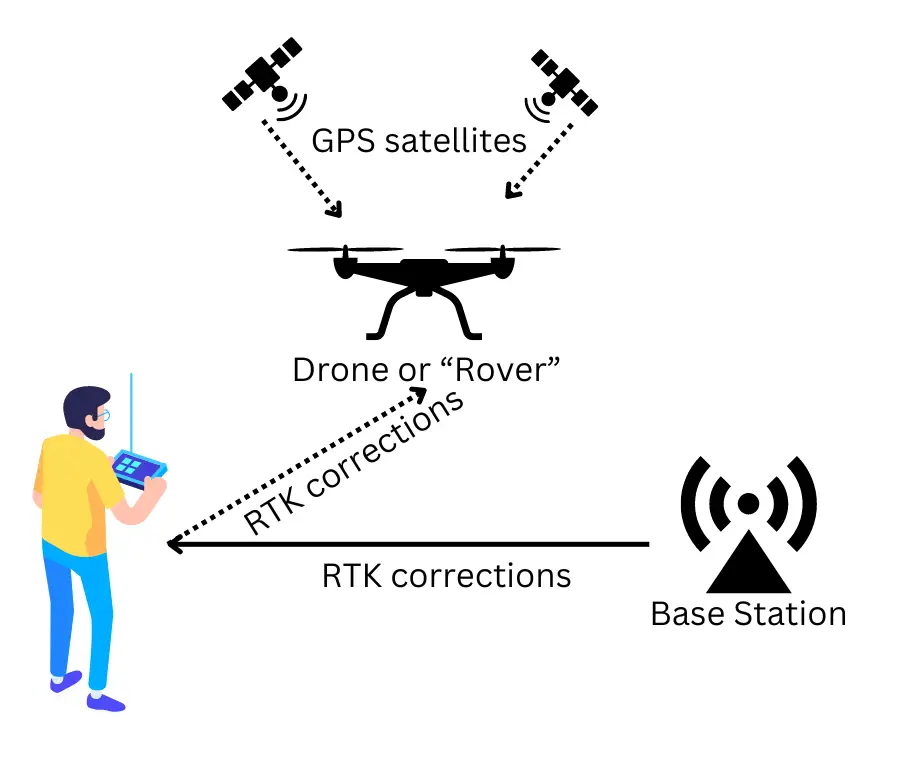
If you own a drone with an RTK module and are looking to achieve centimetre-level positioning accuracy, you will need either an NTRIP subscription or a physical base station. This guide explains how to set up an NTRIP connection for RTK drone mapping in India, helping you unlock the full precision capabilities of your drone.
Why Use RTK for Drone Surveys?
If you are familiar with GPS, think of RTK (Real-Time Kinematic positioning) as GPS on steroids.
- Standard GPS — Positioning accuracy within metres
- RTK GPS — Accuracy within centimetres
To use RTK effectively, you need three components:
- A drone or device equipped with GPS and RTK modules
- Access to a base station (either your own or a subscription service)
- An NTRIP subscription to receive real-time correction data over the internet
What is a Base Station in RTK?
The RTK system consists of two parts:
- Base Station — Sends real-time corrections to account for GPS signal distortions
- Rover — The moving device (your drone) that receives corrections for precise positioning
You have two options for a base station:
- Physical Base Station — Set up your own unit at the worksite (expensive and cumbersome)
- Subscription-Based Service (Recommended) — Use an internet-based correction service, avoiding the need for physical hardware
For most drone RTK mapping operations in India, using a subscription-based NTRIP service is faster, easier, and more cost-effective.
How RTK Corrections Work
GPS signals from satellites are affected by environmental factors like air particles, leading to minor errors. RTK systems send correction data in real time to your drone, adjusting these errors and achieving high precision.
For RTK-enabled drones, the remote controller connects to the internet via mobile hotspot or Wi-Fi, and the RTK corrections are then transmitted from the RC to the drone automatically.
NTRIP Subscription in India — Survey of India CORS Network
In India, the Survey of India operates a growing network of CORS (Continuously Operating Reference Stations) across most states, offering NTRIP subscriptions.
Check CORS coverage: Survey of India CORS Services

Step-by-Step Setup
Step 1: Register
Sign up at the Survey of India CORS Registration portal.
Step 2: Subscribe and Pay
Follow the SOP at Survey of India Subscription SOP. Payments are processed through the Bharatkosh portal. Start with a 1-month basic plan to test connectivity in your area before committing to annual pricing.
Step 3: Get Connection Settings
General settings are available at the CORS Connection Settings page. Note your username and password — you will need these to configure your drone.
Configuring RTK Settings on Your Drone
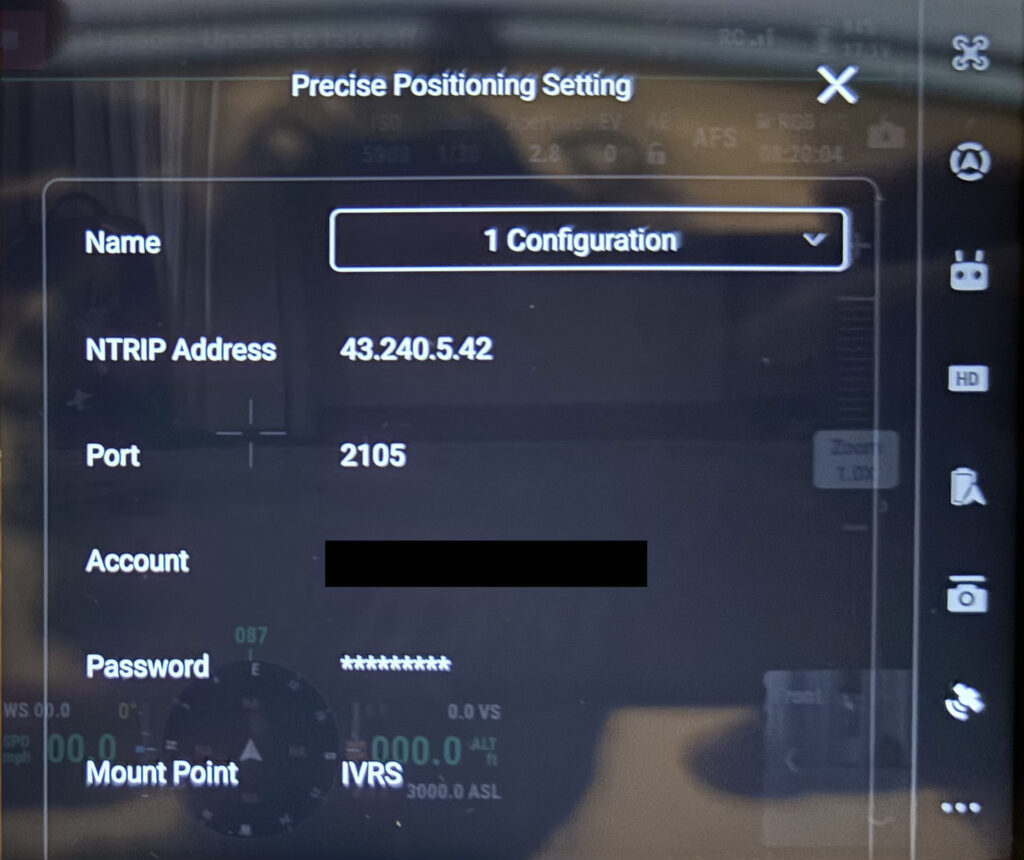
- Go to the RTK settings menu on your remote controller
- Choose Custom Network instead of the proprietary base station option
- Enter the NTRIP Address and Port provided by Survey of India
- Enter your username and password from your subscription
- Set the Mount Point to “IVRS” — recommended for most mapping drones
Tip: Ensure your drone’s remote controller maintains a strong internet connection via mobile hotspot or field Wi-Fi. A dropped connection mid-flight will cause RTK to fall back to standard GPS accuracy.
Conclusion
RTK drone mapping in India is now easier than ever, thanks to the Survey of India’s CORS network. By setting up an NTRIP subscription, you can achieve hassle-free, centimetre-level accurate positioning for drone surveys, agricultural mapping, and terrain analysis.
At Future Thota, we leverage RTK drone surveys to deliver high-precision agricultural and plantation mapping in Coorg and South India. If you need help setting up RTK operations or require drone-based mapping services, contact us.